Away But Not Forgotten
NB is off the grid for the moment, but Kurt Harden has a great place to start if you want to start reading some of NB's many great books.

Web developer with a preference for Ruby on Rails
NB is off the grid for the moment, but Kurt Harden has a great place to start if you want to start reading some of NB's many great books.
Just a few more e-books that I am considering purchasing or they're not released yet.
Some additions to my current reading list involve a couple of new e-books that I have purchased recently.
That's the problem with e-books. They're so damn easy to buy!
Since I went Google free, I’ve been using DuckDuckGo as my primary search engine. It wasn’t really the accumulation of your search history that made me move to DuckDuckGo. I just wanted to try something different.
That said, one of the key things that makes DuckDuckGo different from Google is that your search isn’t tracked. When you search on DuckDuckGo, you remain anonymous. I’m not too concerned about Google archiving my search history; I just wanted to reduce my Google search footprint and see less advertising on my search results.
I have noticed that the search results differ vastly from Google’s regarding the number of results. Google simply offers more results than DuckDuckGo. It is simple numbers. Google has been around longer and has had time to build the most popular search engine. However, I can find what I am looking for on DuckDuckGo most of the time. Where the results haven’t been successful on DuckDuckGo, I can append the !g operator on my search to tell it that I want to search Google. I don’t use this often now, but having it is nice.
A benefit of DuckDuckGo is that the search results can be ad-free. None at all. I love this. Search results that are just search results and nothing more.
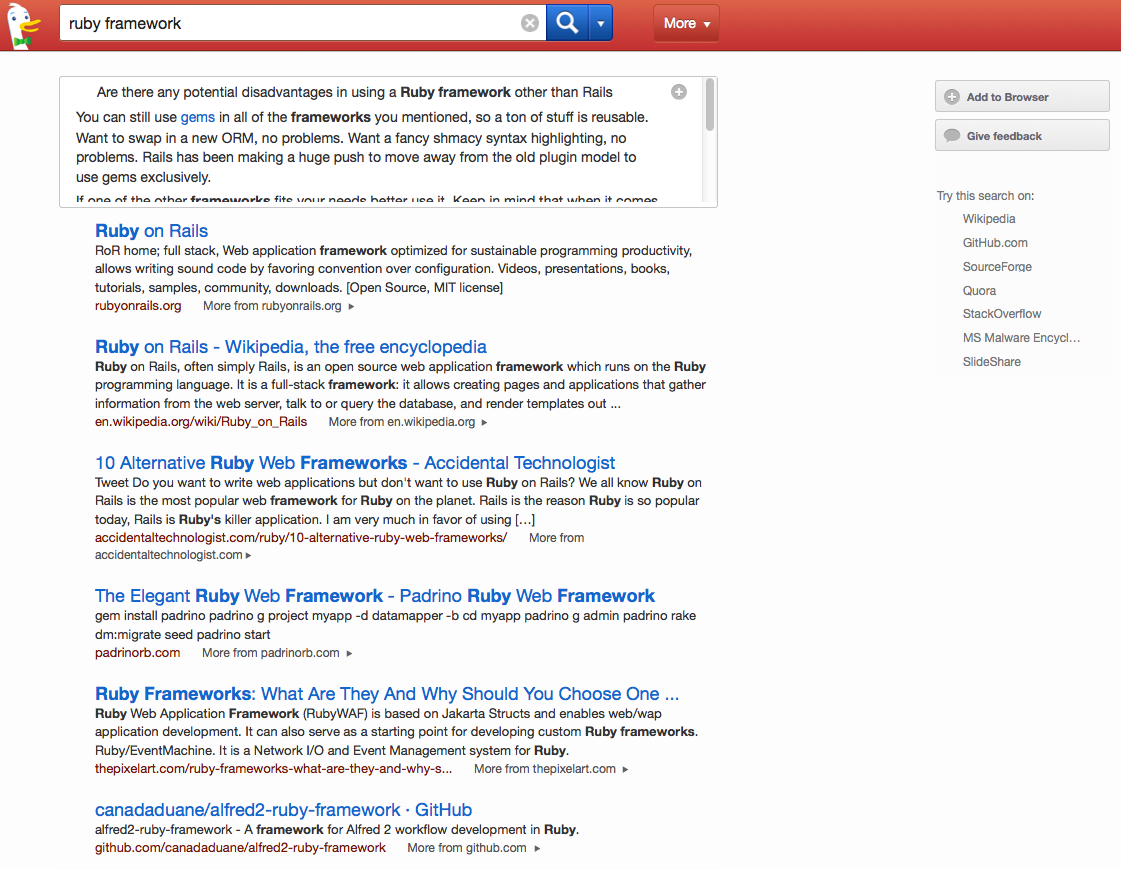
You need to change this in the settings, but seeing a search engine give you this choice is refreshing. For a while, it seemed that Google was hell-bent on pushing as many ads down your throat as possible on a single page.
DuckDuckGo does offer a few extras to help with other tasks besides searching. Aside from the typical math calculations you can enter, you can also do the following:
expand [bit.ly/a](http://bit.ly/a), which will show you the expanded URL on a search results page.on rails will search the Hacker News website for stories and comments containing ‘rails’. password 15 strong will generate a strong password of 15 characters.DuckDuckGo also provides operators that you can use in your searches. It simply means that you can search through other sites right from DuckDuckGo. I use it often for searches on Amazon using !a and Wikipedia using !w. Couple these with searching DuckDuckGo from Alfred, and I have a fast and easy way of searching DuckDuckGo and other sites.
Since I started using DuckDuckGo, I’ve been impressed with its results and capabilities as a search engine. Every day, I learn new shortcuts and ways of searching. That means less mouse clicks for me and less time spent tracking down the search box on other websites. It’s flexible and fast and well worth checking out if you’re looking for an alternative to not just Google but also Yahoo and Bing.
Meet my son Ethan.

He loves playing golf. He's also quite good at it. He might not be the next big thing in golf, but he's better than most kids his age. He attends golf lessons for one hour a week and this year we even got him in as a junior member at a golf club in the area where most of his family play. A chance for him to meet other kids his age and also to get out onto a proper golf course for a change.
Now as parents we all want the best for our kids. It's natural. The best criteria though is interpreted different by different parents though. My interpretation is that I want my kids to be happy and do what they enjoy the most.
Me and Jen don't do the pushy parent thing. He plays golf when he wants to play golf. We don't make him practice for hours on end at home, nor do we make it his exclusive hobby. Just for variety he goes swimmming, plays tennis and wants to up upgrade his bike to a mountain bike for Christmas so that he can go mountain biking with me.
He also does all the usual things kids do, watches television, plays video games, plays outside with his friends and a whole heap of other things that kids are supposed to do (and sometimes not supposed to do!). Quite a good mix for any kid if you ask me.
I'm hoping that this no pressure approach to his golf gives him enough breathing space to be himself and not be put under pressure. He's still a kid and needs to experience his childhood. Sure we still give him a gentle nudge now and again, but that's all it is, a nudge.
When I first started considering the idea of freelancing a couple of years ago, I started to subscribe to a number of blogs of already established freelancers. It was during this time that I discovered Curtis McHale and his excellent blog.
Currently based in British Columbia, Canada, Curtis writes openly about the trials and tribulations of freelancing, writing and products he's working on as well as family life and of course cycling. Just the right mix of categories I would say that almost mirror my interests.
His blog has become a valuable tool in my freelancing career. When I struggled at the start, Curtis provided some great advice for me during that first month and continues to do so today through his blog. I've even signed up for his new book on running a viable freelance business.
It's great to have someone like Curtis there, writing about his freelance career. He's proof that while freelancing is hard work, it's also very rewarding work if done correctly. And that's why I'll continue to read his blog on a daily basis.
I'm in my mid-thirties now. 36 years living on this blue marble in space.
In that time I've had bits of knowledge passed to me by my wife, my kids, my grandparents, my parents, my extended family, my friends, the schools and universities I have attended, the newspapers, magazines and books I have read, the films, television shows and screencasts I have watched, the countless blog posts I have read on the web, my carefully curated daily reading list, the podcasts I have listened to and even the places I have visited around the world.
I have and continue to learn new things almost every day. And that's a good thing, because where would the fun be in life if everyday wasn't a school day.
I've been using Pinboard for sometime now for managing my bookmarks. I can't complain about the service. As bookmarking services go, it's the best out there. However, the other day I seen a screenshot of a private bookmarking service that someone else was using. This person will remain anonymous as they're trying to keep their own bookmarking application low key.
What I loved about the screenshot of their application though was the wealth of information available to you when you viewed a single bookmark from the collection. It contained list of bookmarks with similar tags as well as text from the link itself.
It got me thinking about Pinboard and what contextual information is offered when you are viewing a single bookmark.

Not a lot really. This isn't a complaint against Pinboard, it's a great service and one that I recommend, but it got me wondering about the type of information I would like to see relating to a particular bookmark on the same page.
Here's some things I managed to think of:
I wondered if I should be rolling my own bookmarking application. I'm a developer, and it sure wouldn't be a wasted project to do. I'm always on the look out for something to keep me practicing towards being a skilled developer.
I then wondered if there was anything else I would like my bookmarking application to do. Besides offering more information on a single bookmark, I would like to save notes, but I would like these notes to be written in Markdown and then rendered in nice HTML markup. I have a ton of notes written in Markdown that I have on my MacBook, but I would like them to be viewable on the web by only me.
I suppose my ideal is bookmarking application is more than just for bookmarking. It would be for notes, clips, images and notes. Evernote I hear some of you cry! Yes, I could do all this in Evernote, but that's not the point of this. It's about my ideal bookmarking application, and it doesn't exist ... yet.
On my recent trip to Toronto to visit my in-laws, I noticed something on the flight as we flew over the Atlantic Ocean and into Eastern Canada. Almost no-one was looking out the window. As I got up from my seat to stretch my legs for a walk down the aisle, I looked about the rows of passengers on the flight. Each row contained at least two people with tablets or laptops in their hands with the majority of people left tuned into the on-board movie.
I know that not everyone is blessed with window seats, but the majority of people within the vicinity of a window were not even looking out of the window. During a couple of trips to the back of the aircraft over the course of the flight I noticed that very few people took the opportunity to look out the window. A missed opportunity in my book.
There are some parts of flying that I don't enjoy like queues, security checks and of course the waiting to board, but the one part that I do enjoy is the views from the aircraft. It's a rare opportunity to see the world from the highest point most of us can get to. Only a select number of people around the world manage to make it to higher altitudes like some military pilots, astronauts and of course Felix Baumgartner.
I remember flying to Las Vegas from Toronto a number of years ago and seeing the changing landscape of the American Midwest below us. Having only really flown trans-atlantic flights before, the new landscape was amazing to see. It was startling to see the change from urban sprawl to grassy pastures and then onto mountains and desert.
Flying is also one of the few remaining places where many of us can disconnect from the digital world. I know that some airlines are offering wifi on their flights, but given the choice I would rather fly without wifi. Free from email, social networks and other distractions online, flying is a great opportunity to reflect, catch up on some reading or simply appreciate the view.
For a lot of people air travel doesn't have the same wow factor that it had in the past. Perhaps they've flown so many times, they've simply become acustom to not looking out the window as they have seen it all before. Maybe they're simply not interested in the world below.
With the increased availability of technology on flights perhaps it's time to consider a windowless airplane. Very few people look out of the window these days anyway. I hope it never comes to that, as I do enjoy the view looking down from the skies.
... where you are.
... have been proven to work. So why not use them?
Thanks Curtis.
... with Adam Keys.
Not all tricky problems are complex. Some are presented in a complex way, some are complex because of restrictions that are simply worked around, and some are complex because of an adjoining social problem. Find the simple problem, or the social problem, and solve that instead. It often works for me.
— The Simple Problem Inside the Complex One by Adam Keys
An idea is nothing unless you can tell it to someone else. With the world on the web at your hands, your ideas can now be seen by millions of people in a matter of minutes. Here's a few ways I have tried out communicating various ideas in the past. Each had a degree of success, but I can't recommend one over the others. In the end, they all have their place in getting your ideas out there as they do suit different levels of knowledge, you just have to decide which one will suit you.
Just write about it. Like I said yesterday. Your ideas are perhaps best spread by yourself in the way you describe it through your own words. Publish the idea in your blog and look at the number of views for the idea over time and see if it's maintaining a certain number of views. If your idea is maintaining a steady number of views maybe over a week then your idea could be worth developing further.
This is the simplest but least accurate way of validating an idea. Measuring the popularity of the idea in terms of page views is a simple measure, but what we lack here is the ability to see how many people are genuinely interested in our idea.
Even before you build something around your idea, it's a good idea to get feedback on the popularity of the idea. Landing pages with a signup are a great way to gauge the initial interest in your idea. So even before you have started work on your idea, you can determine if it's worth pursuing.
A landing page gives the benefit of allowing you to get your first set of customers for your idea. Not all the people that signup will actually buy into your idea, but it's fair to say that a percentage of them will consider your idea if your idea will offer some form of value that is worth paying for.
Services like LaunchRock can have a landing page up and running for you in minutes, but it is better to spend the time in getting the landing page right. A little bit more time spent on getting the landing page right can mean a big difference in the number of sign ups you get.
A prototype of your idea is probably the best way to show it to the world, but it is also the most time consuming to put together. You might spend just an hour putting together a blog post, maybe a couple of hours getting a landing page up and running, but a prototype might take you at least a day to put together depending on how much of the idea you want to implement.
The first prototype for Journalong was a spectacularly simple affair. It was just a page with a textbox and a button. No fancy styling, validation or even tests. I was merely testing the idea of submitting my journal entries from a web site to my Dropbox. I showed the idea to a few developers in the team I was working in at the time and they liked the idea. It gave me the confidence to pursue the idea further.
A point to remember when building a prototype is that you should really focus on making it show off the primary value that your idea will give people. For Journalong the value was writing your journal to your Dropbox from anywhere. Web connectivity is almost available everywhere we go, and armed with a smart phone most people are no more than a few clicks away from writing to their journal.
So there you go. Three ways you can communicate your idea to the world. Most people shouldn't have any problem in writing a blog post or even using LaunchRock to put a landing page together. A prototype is a bit more technical and requires more time and effort if you are not familiar with web development.
Next time you have an idea, why not tell a few people? You might just be onto the next big thing.
Every time I write a post for my blog, I ask myself this question:
What if the majority of my readers already know what I'm writing about in this post?
I've purposely held back on a number of ideas for blog posts in the past due to this. I get myself into the mindset that the idea for the blog post will be invaluable to the majority of my readers and therefore I dismiss the idea.
However loooking over my analytics for previous posts I have written that I have questioned but went ahead with, I have been surprised by the number of times the posts I thought would quickly disappear into the archives are still being read by more than a hanful of people every day. Even though I had the belief that the post would only be relevant for a limited time and to a limited number of people, these posts are still drawing in new readers every week.
So my advice to you is this. Even if you think your readers won't find any value in your idea for a blog post, write that blog post anyway. Chances are that someone will find value in your blog post rather than no-one.
Yesterday I told you about the second part to my grass roots productivity approach which is to sort your master list. Today we're going to look at the last part of the series and probably the most important one, working through your list. All the preparation in the world counts for nothing unless we're actually going to work through our list.
I've tried in the past to pick off items from the top of the list at the start of the day, but it often leads to confusion and the wrong things getting done. I've learned now that scheduling actions into my calendar ahead of time is a better way to get things done and more importantly get that item off my master list.
I was prompted to do this after reading 18 Minutes by Peter Bregman. In the book Peter mentions the importance of using a calendar to schedule the items on your list:
If you really want to get something done, decide when and where you are going to do it.
— 18 Minutes by Peter Bregman http://www.amazon.co.uk/gp/product/0446583405/ref=as_li_ss_tl?ie=UTF8&camp=1634&creative=19450&creativeASIN=0446583405&linkCode=as2&tag=mattlang-21 18 Minutes %}
How many times have you picked three things off your list to do during the day and reached the end of the day and not one of those things gets done? That used to happen to me all the time, until I started scheduling my items in my calendar and removing them from my master list. After they were removed from my list, I found it easier to complete the actions in my calendar.
Scheduling items in your calendar also means you are working to your strengths, the times when you are most productive. We all have different times in the day when we are most productive. I'm more productive in the morning, so I usually schedule difficult tasks in the morning and leave the mundane jobs to the afternoon.
That's it for my grass root productivity series. Being productive doesn't mean you need to have any kind of complicated system, multiple applications and countless reminders. The simplest thing you can do is work through a single prioritised list at the times that suit you the best. That's all there is to it.
What I have outlined over the last three days is what is working best for me right now and don't see any benefit to changing it. I'm not saying this is the best system to use, but it is the simplest thing you can do that will work. There's lots of other workflows out there that others will advocate. You just need to find what works best for you.

via FGGT
Yesterday I introduced you to the first step to getting productive, keeping a master list of everything you want to do and must do. So what's next? Just pick off the stuff we want to do? No. We need order. We can't do everything at once, but we also want to move towards what we want to do while at the same time checking of those mundane tasks we need to do. We need to prioritise.
Take your list and sort it. It's as simple as that. Put the stuff you want to do sooner at the top and the stuff that can wait at the bottom. Simple right? No numbering systems or sort labels here. Just the order of the list itself. Granted this is easier if your list is managed with something like TaskPaper, but I think that even doing this with pen and paper isn't going to be too long an exercise. Also, with pen and paper it gives you a chance to think about each item on your list. Is it important? Can it wait?
Prioritising your list is one of the simplest things you can do to get your list in an order that makes it easy to tackle. Cherry picking items from your master list will lead to you only doing the easy things or things you want to do. Doing this will mean that you'll never get round to writing that novel or building the next big app that will take the world by storm. Prioritising your list gives you an order in which to tackle your list. You're putting the items that matter or need to be done at the top of your list.
I usually review my master list on a weekly basis. Usually this involves just moving the items that have been recently added to their appropriate space in the list. My priorities are long term, so the order of my list doesn't change drastically from week to week. What I do see though is items gradually moving up the list which shows that I am moving forward with my projects and tasks and there's nothing lying stale at the bottom of the list for too long.
Don't forget to mix the list so that it's not all the things you want to do at the top. Working towards a dream holiday or breaking the top 10 best selling books can't be your only focus. There's still stuff to do on a day to day basis. Bills need to be paid, kids need to be taken to their extra curricular activities and such. So make sure your list is evenly mixed with those things you want to do and things you must do. Keeping this balance is important to working through your master list.
Being productive means keeping track of everything you want to do. This is the first step in being productive. We do this by keeping a master list. This is where you list everything you want to do. And I mean everything. The master list isn't a to do list. To do lists are started with the best of intentions and then neglected. Just the mention of a "to do" list makes me not want to do anything on it. The master list is different. It's filled with things you must do and the things you want to do1. Think carefully about these two types of actions for a minute. They're very different.
Yes, you must book the car in for a service, you must pay that bills before the end of the week and of course there's hundreds of other things you must do. What about the things you want do? Write a novel, produce a movie, backpack across Asia. How many of these things do you have on your list? If you don't have any then why not? These are still things you want to do. If you don't list them, how are you ever going to start on the path to actually doing them?
Here's a selection of actions from my master list:
Do you see any mundane chores here? Yes there's two, but there should be more to your master list than the things you must do. It should also have the things you want to do. I know the stuff that needs to be done on a day to day basis so I dump it on my master list so I don't forget, but I also dump the things I want to do. Otherwise I'll never get round to doing the things I want to do. Your master list is a reminder of everything you want to do.
So my advice to you is to list everything you want to do and must do in one place, your master list. You don't need a fancy app to do it in either. Pick up a notebook and pen and start writing your master list. Go offline for a bit and think about the things you must do and the things you want to do. The things you really want to do. You'll be amazed by how many things you want to do that get added to the list if you don't think of the list as a todo list.
I must have read hundreds of articles on productivity, getting things done, todo lists and of course I've used my fair share of apps that are supposed to help you work better and more productively. None of the apps really stuck with me and the techniques I tried to follow were frequently more complicated than I needed. About a year ago I decided to give up the ghost on trying different techniques and just do what makes me happy.
So what is productivity? Various books and systems would have you believe that by cutting corners you can get more done. Cutting corners makes you go faster, but is that true productivity?
Here's my definition of productivity:
Productivity: The practice and understanding of completing projects and tasks for yourself in the way that works best for you.
I think many people misunderstand productivity. Typically productivity has the definition of working efficiently. I imagine this as someone completing as many actions as possible in a single day. However, completing as many actions as possible in a single day doesn't mean you understand what you have just done. And that for me is the real trick in moving a project forward. Understanding clearly what has been done in the past so that we can move a project forward in the right direction in the future.
This week I am going to run a series of posts on the grass roots of productivity. The absolute basics, nothing more. There's no complicated workflow or specific apps needed to using my method. In fact it's not really a method, or even mine, it's just the simplest thing that works for me and may work for you too.
It simply requires a list management tool of your own choice and the will to work. Yes, you need to tell yourself you want to work. How many times have you heard that mentioned in productivity articles? I haven't seen it mentioned too many times.
The series starts tomorrow and runs until Friday.
I hope you enjoy it.

There's more where this came from on the Astronomy Photographer of the Year shortlist.
via Mme. Scherzo
... when you don't have a shed. Matt Gemmell offers some great advice on getting it done.
Patrick Rhone reminds us that our notes are always there for us.
I have found that the longer my used notebooks sit on a shelf, the more valuable they become to me. That I often do not — can not — recognize the full worth of a thought, idea, or conversation I have captured until it has gone long forgotten on a shelf or in past pages. Only when I stumble upon it with eyes anew does the true importance shine through.
— The Shelf of Notes by Patrick Rhone
Make sure you review them at some point. They can make great reading.
I first started following Kurt's blog, Cultural Offering, on the recommendation of Nicholas Bate a few years ago. What I love about Kurt's blog is that his is more of a journal than anything else. Political stories, current affairs, sports, family life and of course the occasional shots of what's being cooked on the grill. A true slice of life on the American side of the pond.
You just need to take a look at the categories that Kurt has listed on his blog to see the diverse range of topics he blogs about. There's everything here. And that's the key thing I love about Kurt's blog. Diversity. I like specialist blogs, I really do, but Kurt's blog really stands out because he just posts what interests him.
Always a pleasure to read and always different. That's Kurt Harden.

via FGGT
